


Cape Cod Times, Hyannis, Mass.
3.464.00 Reviews
App Specs
- Version
- 8.10.3
- Updated On
- License
- Free
- Downloads
- 10,000+
- Developer
- USA TODAY Co.
- Categories
- News & Magazines
- Platform
- Android
Screenshots






 Analysis by AppCompare
I judge a local news app less by how much it promises than by whether it helps me find useful reporting without making the experience feel complicated. The Cape Cod Times app is aimed at readers who want news tied to Hyannis and Cape Cod, along with broader coverage. I’d treat it as a focused regional reading option rather than a replacement for every source I use to follow national and world events.
What trust means for a local news reader
News apps invite a particular kind of trust: I want to know what I’m reading, find the topic I came for, and make deliberate choices about how much the app interrupts me. The publisher is USA TODAY Co., and the app sits in the news and magazines category. That context tells me who is behind the product and what it is for; it does not, by itself, answer questions about permissions or data handling. I would avoid treating a familiar publisher name as a substitute for checking the choices shown on my own device.
The app is free to install, though it lists in-app purchases priced from $19.99 to $69.99 per item. That makes it sensible to distinguish between getting the app and deciding whether to pay for anything within it. I’d first use the free experience to see whether its local reporting fits my routine, then review any purchase screen carefully before committing. A payment prompt is a moment to pause and read the terms displayed there, not to assume that every article or feature is included at no cost.
What I can verify, and what I should check myself
The app is rated for Everyone, which describes its content-rating classification; it isn’t a promise that every story will suit every reader. Its current version is 8.7.1, and the minimum operating-system requirement is version 8.0. Those details can help me decide whether my device can run it, but they don’t tell me what permissions it requests after installation. I’d check the permission prompts as they appear and allow only what I understand and want to enable.
That distinction matters with any news app. Reading a story does not require me to assume that location access, notifications, or other device permissions are necessary. If a prompt appears, I can consider whether the requested access makes sense for the action I’m taking. I would also look for account and privacy controls in the app or device settings before sharing information or changing how I receive alerts. I can’t infer specific controls that I haven’t seen, so my advice is to use the visible settings rather than rely on assumptions.
When a small choice can change the experience
Notifications are useful when they surface something I genuinely need to know, but they can turn a quiet reading habit into a stream of interruptions. The published article describes options for choosing which alerts to receive; I’d start narrowly and keep only the topics that help me act, such as a local development I’m following. If an alert stops being useful, reviewing the app’s notification settings on the device is a practical first step. That approach keeps the phone from deciding the pace of my news consumption for me.
Sharing and commenting also deserve a little thought. Sharing a story with a relative can be an easy way to discuss a local issue, while a public comment is a more visible choice than simply reading. Before posting, I’d check the prompts and rules presented in the app and avoid including personal details I wouldn’t want attached to a public discussion. This isn’t a claim about a particular moderation or privacy policy; it’s a sensible habit whenever an app lets readers participate.
Worth Reading Before You Choose

EA SPORTS FC Mobile 26 Is a Bigger Football Game, but It Takes Time

Flipboard Shows What News Apps Must Do Beyond the Feed

Switching to Android Auto Means Rethinking Your Driving Routine

Google Calendar Makes a Crowded Week Easier to Manage

Ludo King Makes the Most of the Minutes Between Plans

Baby Panda World Brings Quick Play to Modern Phones, but Its Game Library Feels Busy
A measured verdict on using it
The app has an average rating of 3.5 from 139 ratings, with 64 written reviews, and it has passed 10,000 installs. I see those figures as context, not a verdict on whether it will suit my needs. Reader expectations differ: someone who wants a local connection may value coverage that a broad national news app cannot prioritize, while someone looking for a highly customized national briefing may prefer a different source.
For me, the best reason to try it is straightforward: I want a convenient way to check what’s happening around Cape Cod without beginning every news session with a broad search. The best reason to be cautious is equally practical: I should know what I’m opting into, especially around purchases, notifications, comments, and any permission prompts. If those choices feel clear and the local reporting earns a regular place in my day, it could be worth keeping. If I mainly want national headlines or prefer to read news in a browser, another option may fit better.
Easy Navigation and User-Friendly Design
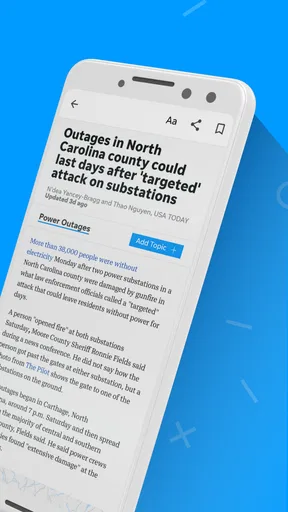
The first thing you'll notice when you fire up the Cape Cod Times app is its clean, intuitive interface. It's like they read my mind and designed it just for someone who appreciates straightforward navigation. Whether you're tech-savvy or just getting started with apps, you'll find it a breeze to locate the news you care about.
Everything is neatly categorized, and with a few taps, you're diving into local news, sports updates, or even the latest on arts and culture. It’s like having a personalized newsstand in your pocket.
Local News at Your Fingertips
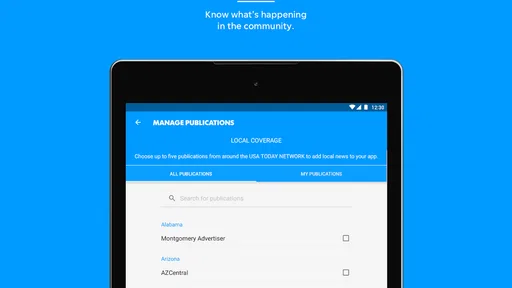
Living in or around Hyannis, knowing what's happening locally is crucial. With this app, you get access to real-time updates on everything from community events to local politics. It feels like having an inside scoop on all the happenings around town. For anyone who wants to stay informed about their community, this app is a must-have.
And let's not forget about the weather updates. Planning a weekend getaway or just stepping out for a quick errand? The app’s up-to-the-minute weather reports ensure you’re never caught off guard by unexpected weather changes.
Interactive Features That Engage
One of the standout features of this app is its interactive elements. You can easily share articles with friends or family, and the comment section allows for engaging discussions with other readers. It’s like having a mini forum right there in the app. Plus, if you're someone who likes to voice your opinion, you’ll appreciate how easy it is to leave comments and join conversations.
Notifications That Matter
No one likes being bombarded with unnecessary notifications, right? The Cape Cod Times app gives you control over what notifications you receive. Whether it’s breaking news, sports scores, or traffic alerts, you can customize your preferences to ensure you only get the alerts that matter to you. It’s all about making the news experience personal and relevant.
Offline Reading for the On-the-Go
Another feature that’s worth highlighting is the ability to save articles for offline reading. If you're like me and often find yourself in areas with spotty internet, this feature is a lifesaver. You can queue up a slew of articles and read them at your leisure, even without a data connection.
Why You Should Download It
If you’re someone who’s constantly on the move but doesn’t want to sacrifice staying informed about local happenings, the Cape Cod Times app is a no-brainer. It seamlessly blends accessibility with comprehensive coverage, making it easier than ever to stay connected to Hyannis and the surrounding area.
In a world where information overload is all too common, having a reliable source that's tailored to your interests is invaluable. The Cape Cod Times app delivers just that, with a user-friendly experience that keeps you in the loop without overwhelming you.
So, if you haven’t already, give the Cape Cod Times app a go. It’s your portable connection to everything local, and trust me, once you start using it, you won’t want to go back to life without it.
Pros
- User-friendly interface with easy navigation.
- Local news coverage is timely and comprehensive.
- Customizable alerts for breaking news.
- High-quality images and video content.
- Offline reading available for convenience.
Cons
- Some sections have frequent ad interruptions.
- Limited national and international news.
- Occasional lag in app performance.
- No dark mode available for night reading.
- Requires login for personalized features.
FAQs for Cape Cod Times, Hyannis, Mass.
What features does the Cape Cod Times app offer?
The Cape Cod Times app provides users with access to the latest news, sports updates, weather forecasts, and local event information. It also offers interactive features like personalized notifications and the ability to save articles for offline reading. The app ensures users stay connected with the Cape Cod community.
Is the Cape Cod Times app free to use?
The Cape Cod Times app is free to download and offers limited access to articles and features. However, for full access to all content, including premium articles and exclusive features, a subscription may be required. This subscription helps support the local journalism provided by the Cape Cod Times.
How do I customize notifications in the Cape Cod Times app?
To customize notifications, navigate to the settings menu within the app. Here, you can select the types of notifications you wish to receive, such as breaking news, sports, or weather updates. This allows you to tailor your experience and stay informed about the topics that matter most to you.
Can I read articles offline with the Cape Cod Times app?
Yes, the Cape Cod Times app allows users to save articles for offline reading. Simply tap the save icon while connected to the internet, and the article will be available in your saved section for later access, even when you're offline. This feature is perfect for staying informed while on the go.
How frequently is content updated in the Cape Cod Times app?
Content in the Cape Cod Times app is updated continuously throughout the day to ensure timely and accurate information. News articles, weather updates, and event details are refreshed regularly, allowing users to access the most recent developments and stay up-to-date with local happenings.


